
From Novelty to Production Tool
AI video generators have moved from novelty to serious production tools in 2026. They turn text prompts, images, or scripts into short videos in minutes.
The market is now crowded, and each tool is built for a different kind of output. Some focus on cinematic motion, while others specialize in talking avatars.
This guide compares the leading options and explains how each one works. By the end, you will know which tool fits your goals and budget.
Cinematic Motion or Talking Avatars
There is no single winner, because the best choice depends on what you want to create.
Pick Runway or Luma if you want realistic, cinematic motion from text or image prompts.
Pick Synthesia or HeyGen if you need avatar presenters reading a script for training or marketing.
Pick Pika if you want fast, stylized clips for social media without a steep learning curve. The comparison table below breaks down where each tool is strongest.
What Are AI Video Generators?
AI video generators are tools that create moving footage from simple inputs. Those inputs can be a written prompt, a still image, or a full script.
Behind the scenes, they use generative models trained on large video datasets. The model predicts frames that flow together into a short clip.
Some tools focus on generating scenes from imagination, like a fox running through snow. Others focus on realistic human avatars that speak your words on camera.
Understanding this split is the first step to choosing well. The right category matters more than any single feature.
Comparison Table
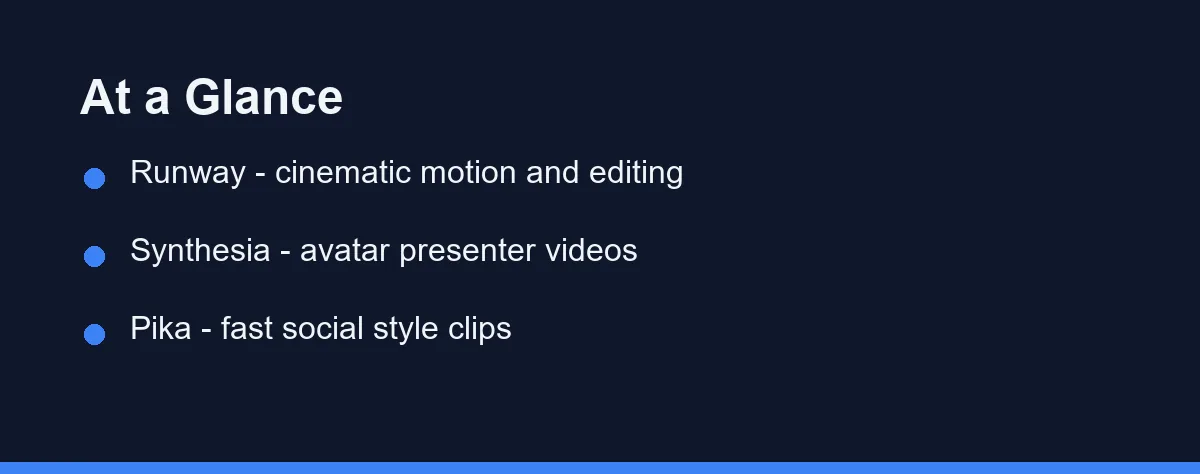
The table below summarizes the practical differences between the leading tools. Use it as a quick reference before reading the deeper sections.
| Tool | Best For | Input Style | Strength | Learning Curve |
|---|---|---|---|---|
| Runway | Cinematic and creative video | Text, image, video | Editing and motion control | Moderate |
| Synthesia | Avatar presenter videos | Script and templates | Realistic talking avatars | Easy |
| Pika | Social and stylized clips | Text and image | Speed and fun effects | Easy |
| Luma | Realistic motion clips | Text and image | Natural physics and depth | Moderate |
| HeyGen | Marketing and spokesperson | Script and avatars | Multi language voice clips | Easy |
Each tool overlaps a little, but their core focus is distinct. The next sections explain what that means in practice.
Runway: Cinematic Creation and Editing
Runway is one of the most established names in AI video. It targets creators who want both generation and editing in one place.
You can start from a text prompt, an image, or existing footage. The platform also includes tools for motion brushes, camera control, and scene extensions.
This makes it popular with filmmakers, ad teams, and motion designers. The trade-off is that the depth of features can feel like a lot at first.
If your goal is polished, directed video, Runway gives you fine control. Beginners may need a short ramp-up before results look professional.
Synthesia and HeyGen: Avatar Presenters
Synthesia and HeyGen sit in a different category from prompt-based tools. They focus on realistic avatars that speak a script you provide.
You type or paste a script, choose an avatar and voice, and the tool renders a presenter video. Many offer dozens of languages and accents. For standalone narration and voiceovers, compare the best AI voice generators.
This is ideal for training modules, product explainers, and corporate communications. It removes the need for cameras, studios, or on-camera talent.
The limitation is creative range, since these are presenter videos rather than open scenes. For talking-head content, though, they are hard to beat.
Pika and Luma: Fast and Realistic Clips
Pika and Luma represent the fast-moving consumer end of the market. Both turn short prompts into clips quickly and with little setup.
Pika leans toward playful, stylized output that works well on social platforms. Its effects and quick edits make it friendly for casual creators.
Luma focuses more on realistic motion, natural physics, and a sense of depth. It appeals to users who want believable movement without heavy editing.
Neither tool aims to be a full editing suite. They shine when you need a strong clip fast rather than a finished production.
Decide the Output Before the Tool

Start by naming your output goal before you compare features. A training video and a cinematic ad have very different needs.
If you need a presenter, choose an avatar tool like Synthesia or HeyGen. If you need imaginative scenes, choose a prompt tool like Runway or Luma.
Next, test the free credits or trials that most platforms offer. A short test reveals quality, speed, and how the interface fits your habits.
Finally, confirm licensing and export quality on the official site. These details matter most once you move from experimenting to publishing.
From Social Ads to Storyboards

AI video tools now cover a wide range of practical jobs. Knowing the common patterns helps you match a tool to your work.
Marketing teams use them for social ads, product teasers, and quick promos. Speed and a steady stream of fresh clips are the main draw here.
Educators and HR teams use avatar tools for training and onboarding. These videos are easy to update when a script or policy changes.
Creators and filmmakers use prompt tools for storyboards and concept clips. They can visualize an idea before committing to a full shoot.
Watermarked Free Tiers and Paid Rights
Most AI video generators use tiered subscription plans. Pricing changes often, so always confirm current numbers on each official site.
Free tiers usually exist but add watermarks or limit clip length and resolution. They are useful for testing rather than final production work.
Paid plans typically unlock longer videos, higher resolution, and commercial rights. Heavier users often save money on annual plans over monthly billing.
As a rule, match the plan to your real output volume. Occasional creators can start free, while teams benefit from higher tiers.
What Each Video Platform Gives Up
Every tool involves trade-offs, so a balanced view helps. No single platform is best at everything at once.
Prompt-based tools like Runway and Luma offer creative range and realistic motion. The cost is a steeper learning curve and more time spent directing output.
Avatar tools like Synthesia and HeyGen are fast and consistent for presenters. The limit is that they are not built for open, imaginative scenes.
Consumer tools like Pika win on speed and simplicity. They are less suited to long-form or highly polished productions.
How These Compare to Other AI Tools
AI video is just one part of a wider creative toolkit. Many creators pair video tools with writing and chat assistants.
For scripts and captions, a strong writing tool speeds up the whole pipeline. See our guide to the best AI writing tools for options that fit this stage.
Once the clip exists, reaching a second language is a separate decision with its own budget. Our AI dubbing vs subtitles comparison covers which one to add first and why the cheaper option often wins.
For brainstorming concepts and refining prompts, a capable chat model helps a lot. Our ChatGPT vs Claude vs Gemini comparison breaks down the leading choices.
Used together, these tools form a fast workflow from idea to finished clip. Video generation is the final step rather than the whole process.
A typical pipeline might start with a chat model shaping the concept. Then a writing tool drafts the script and captions for the scene.
Finally, a video generator turns that script into the moving footage. Thinking in stages keeps each tool focused on what it does best.
Which Video Tool Fits Your Project
These tools are built for genuinely different outputs, so the right pick follows what you are making. Match your project to the closest case.
The team producing training or onboarding videos: Synthesia or HeyGen fits, because a script-driven avatar renders consistently and updates when the policy changes. Re-recording a single slide costs nothing compared with rebooking a shoot. Multi-language voice options matter if you support staff in several regions.
The filmmaker or ad creative: Runway gives the most direction over motion, camera, and scene extension, which is what separates a usable shot from a lucky one. Expect a real learning curve, since control is the whole point of the platform. Budget generation credits for iteration rather than a single perfect render.
The social creator posting several clips a week: Pika is built for speed and stylized output, and the low learning curve matters more than fine control at that pace. Luma is the better choice when the clip needs to look believable rather than playful. Test both on the same prompt before subscribing.
The marketer who needs a spokesperson without a studio: HeyGen leans toward marketing and multi-language delivery, which suits product explainers and regional campaigns. Confirm the licensing terms for commercial use and for any avatar likeness on the official site. Those terms matter more than output quality here.
The person just exploring what is possible: Start on free credits across two tools rather than paying for one. Watermarks and resolution caps make free tiers unsuitable for publishing but perfect for judging quality. Confirm current plans and export resolution before you move anything to a client project.
Test Two Before You Subscribe
The best AI video generator in 2026 depends entirely on what you want to make. Cinematic creators lean toward Runway and Luma, while presenters favor Synthesia and HeyGen.
For fast social clips, Pika remains a friendly and capable option. The smartest approach is to test two or three tools with free credits first.
Match the tool to your output goal, confirm licensing, and check current pricing on official sites. With the right fit, you can turn a simple idea into finished video faster than ever.
FAQ
What is the best AI video generator in 2026?
There is no single best tool for everyone. Runway and Luma lead on realistic motion, while Synthesia and HeyGen lead for talking-head and presenter videos.
Are there free AI video generators?
Several tools offer free tiers or trial credits, but they usually add watermarks or limit length. Check each official site for current free options.
Can I use AI generated videos commercially?
Many platforms allow commercial use on paid plans, but terms vary by tool and by content type. Always confirm the license on the official site before publishing.
How long can a generated clip be, and how do I make a longer video?
Prompt-based tools such as Runway, Pika, and Luma generate short clips rather than finished videos, and most plans cap a single generation at a few seconds. Longer pieces are assembled the way traditional video always was, by generating several shots and cutting them together in an editor, with extend features stretching a shot where the tool supports it. Avatar platforms like Synthesia and HeyGen behave differently, since they read a full script and can produce minutes of presenter footage in one render. Clip length limits change with each model release, so check the current limits on the official site before planning a project around them.
Can I keep the same character and style consistent across several clips?
Consistency is still the hardest part of prompt-based video, because each generation is a fresh roll of the dice. The practical workarounds are to start from a fixed reference image rather than text alone, reuse the same seed and style wording where the tool allows it, and keep shots short so drift has less time to show. Hands, faces, and on-screen text are where artifacts appear first, which is why wider framing and shorter takes tend to look cleaner. When you need the same person in every scene, an avatar tool like Synthesia or HeyGen solves the problem by design.
Some links may be affiliate links. We may earn a commission at no extra cost to you.
This article was written with AI assistance. It is researched and fact-checked, not based on personal hands-on testing unless explicitly stated.
Comments
Post a Comment